Showing posts with label Widget Ready. Show all posts
0


Template name : TheTechNews

Template type : 2 Sidebar, 3 Column, Blue, Featured Section, Fixed width, Free Blogger Templates, Fresh, Games, Gray, Left Sidebar, Magazine, Right Sidebar, SEO Optimized, Slider, Slideshow, Top Navigation Bar, White, Widget Ready, Wordpress Look

Release date : February 2012

Coder/Designer Name(s) : Klodian

Coder/Designer's(URL) : www.deluxetemplates.net

Basic Instructions : How to install a Blogger template

Advanced Details : See Text files


Configure Meta tags

Login to your blogger dashboard--> layout- -> Edit HTML.Now Scroll down to where you see below codes :

<meta content='DESCRIPTION HERE' name='description'/>
<meta content='KEYWORDS HERE' name='keywords'/>

Replace DESCRIPTION HERE,KEYWORDS HERE as below.

DESCRIPTION HERE:Write your blog description
KEYWORDS HERE:Write the keywords of your blog separated by comma.

How To Configure Favicon:

Login to your blogger dashboard--> layout- -> Edit HTML.Now Scroll down to where you see below code :

<link href='YOUR-FAVICON-URL' rel='shortcut icon' type='image/vnd.microsoft.icon'/>

Now replace "YOUR-FAVICON-URL" with your Favicon address/url.


0


Template name : Traveler

Template type : 1 Sidebar, 2 Column, 2 Column footer, Blue, Featured Section, Fixed width, Gray, Premium, Right Sidebar, SEO Optimized, Slider, Top Navigation Bar, White, Widget Ready, Wordpress View

Release date : December 21, 2011

Coder/Designer Name(s) : Lasindu NAdishan

Coder/Designer's(URL) : www.Coolbthemes.com

Basic Instructions : How to install a Blogger template

Advanced Details :


Configure Meta tags

Login to your blogger dashboard--> layout- -> Edit HTML.Now Scroll down to where you see below codes :

<meta content='DESCRIPTION HERE' name='description'/>
<meta content='KEYWORDS HERE' name='keywords'/>

Replace DESCRIPTION HERE,KEYWORDS HERE as below.

DESCRIPTION HERE:Write your blog description
KEYWORDS HERE:Write the keywords of your blog separated by comma.

How To Configure Favicon:

Login to your blogger dashboard--> layout- -> Edit HTML.Now Scroll down to where you see below code :

<link href='YOUR-FAVICON-URL' rel='shortcut icon' type='image/vnd.microsoft.icon'/>

Now replace "YOUR-FAVICON-URL" with your Favicon address/url.


0


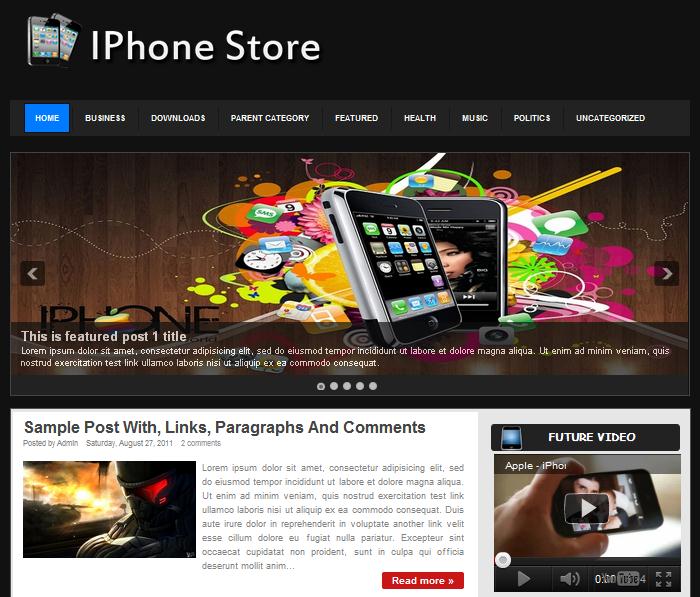
Template name : IPhone Store

Template type : 1 Sidebar, 2 Column, 3 Column footer, Black, Elegant, Featured Section, Fixed width, Gray, Magazine, Right Sidebar, SEO Optimized, Slider, Top Navigation Bar, Widget Ready, Wordpress View

Release date : November 24, 2011

Coder/Designer Name(s) : Sameera Chathuranga

Basic Instructions : How to install a Blogger template

Advanced Details : See text file


Configure Meta tags

Login to your blogger dashboard--> layout- -> Edit HTML.Now Scroll down to where you see below codes :

<meta content='DESCRIPTION HERE' name='description'/>
<meta content='KEYWORDS HERE' name='keywords'/>

Replace DESCRIPTION HERE,KEYWORDS HERE as below.

DESCRIPTION HERE:Write your blog description
KEYWORDS HERE:Write the keywords of your blog separated by comma.

How To Configure Favicon:

Login to your blogger dashboard--> layout- -> Edit HTML.Now Scroll down to where you see below code :

<link href='YOUR-FAVICON-URL' rel='shortcut icon' type='image/vnd.microsoft.icon'/>

Now replace "YOUR-FAVICON-URL" with your Favicon address/url.

0


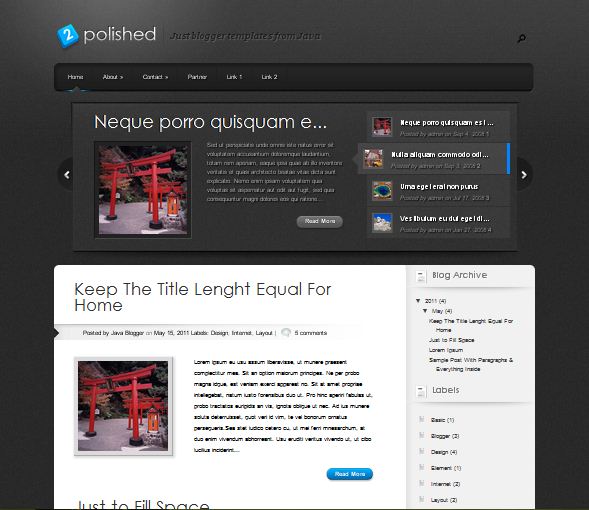
Template name : Polished

Template type : 1 Sidebar, 2 Column, 3 Column footer, Black, Business, Featured Section, Fixed width, Gray, Magazine, Right Sidebar, SEO Optimized, Slider, Top Navigation Bar, White, Widget Ready, Wordpress View,

Release date : July 11, 2011

Coder/Designer Name(s) : Rifki Aria Gumelar

Basic Instructions : How to install a Blogger template

Advanced Details : www.javatemplates.com/2011/evo/


Configure Meta tags

Login to your blogger dashboard--> layout- -> Edit HTML.Now Scroll down to where you see below codes :

<meta content='DESCRIPTION HERE' name='description'/>
<meta content='KEYWORDS HERE' name='keywords'/>

Replace DESCRIPTION HERE,KEYWORDS HERE as below.

DESCRIPTION HERE:Write your blog description
KEYWORDS HERE:Write the keywords of your blog separated by comma.

How To Configure Favicon:

Login to your blogger dashboard--> layout- -> Edit HTML.Now Scroll down to where you see below code :

<link href='YOUR-FAVICON-URL' rel='shortcut icon' type='image/vnd.microsoft.icon'/>

Now replace "YOUR-FAVICON-URL" with your Favicon address/url.


0


Template name : Notepad Chaos

Template type : 1 Sidebar, 2 Column, Artworks, Black, Elegant, Featured Section, Fixed width, Flower, Gray, Green, Header Banner, Magazine, Nature, Personal, Right Sidebar, Slider, Top Navigation Bar, Widget Ready, Wordpress View,

Release date : October 12, 2011

Coder/Designer Name(s) : Evan Eckard

Basic Instructions : How to install a Blogger template


Configure Meta tags :

Login to your blogger dashboard >> layout >> Edit HTML.Now Scroll down to where you see below codes:


<meta content='DESCRIPTION HERE' name='description'/>
<meta content='KEYWORDS HERE' name='keywords'/>

Replace DESCRIPTION HERE,KEYWORDS HERE as below.

DESCRIPTION HERE:Write your blog description
KEYWORDS HERE:Write the keywords of your blog separated by comma.

How To Configure Favicon:

Login to your blogger dashboard--> layout- -> Edit HTML.Now Scroll down to where you see below code :


<link href='YOUR-FAVICON-URL' rel='shortcut icon' type='image/vnd.microsoft.icon'/>
Now replace "YOUR-FAVICON-URL" with your Favicon address/url.


0


Template name : Stand Alone

Template type : 1 Sidebar, 2 Column, Artworks, Black, Elegant, Featured Section, Fixed width, Flower, Gray, Green, Header Banner, Magazine, Nature, Personal, Right Sidebar, Slider, Top Navigation Bar, Widget Ready, Wordpress View,

Release date : October 12, 2011

Coder/Designer Name(s) : Lasantha Bandara / New WP Themes

Basic Instructions : How to install a Blogger template


Configure Meta tags :

Login to your blogger dashboard >> layout >> Edit HTML.Now Scroll down to where you see below codes:


<meta content='DESCRIPTION HERE' name='description'/>
<meta content='KEYWORDS HERE' name='keywords'/>

Replace DESCRIPTION HERE,KEYWORDS HERE as below.

DESCRIPTION HERE:Write your blog description
KEYWORDS HERE:Write the keywords of your blog separated by comma.

How To Configure Favicon:

Login to your blogger dashboard--> layout- -> Edit HTML.Now Scroll down to where you see below code :


<link href='YOUR-FAVICON-URL' rel='shortcut icon' type='image/vnd.microsoft.icon'/>
Now replace "YOUR-FAVICON-URL" with your Favicon address/url.
0


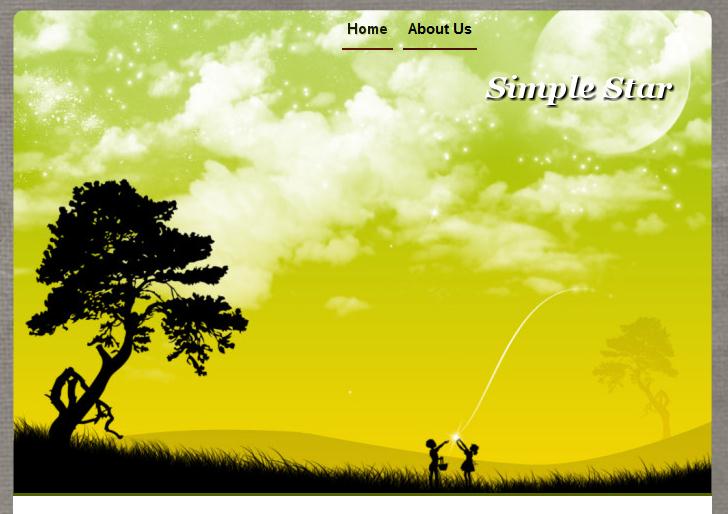
Template name : Simple Star

Template type : 1 Sidebar, 2 Column, Black, Fixed width, Flower, Gray, Green, Personal, Right Sidebar, Simple, Top Navigation Bar, White, Widget Ready

Release date : 2011

Coder/Designer Name(s) :

Basic Instructions : How to install a Blogger template


How to use this template:


Configure Meta tags:


Login to your blogger dashboard >> Template >> Edit HTML.Now Scroll down to where you see below codes:


<meta content='DESCRIPTION HERE' name='description'/>
<meta content='KEYWORDS HERE' name='keywords'/>

Replace DESCRIPTION HERE,KEYWORDS HERE as below.

DESCRIPTION HERE:Write your blog description
KEYWORDS HERE:Write the keywords of your blog separated by comma.

How To Configure Favicon:

Login to your blogger dashboard--> layout- -> Edit HTML.Now Scroll down to where you see below code :


<link href='YOUR-FAVICON-URL' rel='shortcut icon' type='image/vnd.microsoft.icon'/>
Now replace "YOUR-FAVICON-URL" with your Favicon address/url.

0


Template name : Minimal

Template type : 1 Sidebar, 2 Column, Artworks, Fixed width, Icon, Miami Condos, Personal, Right Sidebar, Simple, Top Navigation Bar, W South Beach, White, Widget Ready


Release date : January 14, 2010


0


Template name : Classy

Template type : 1 Sidebar, 2 Column, Fixed width, Gray, Icon, Miami Condos, Personal, Right Sidebar, Simple, Top Navigation Bar, W South Beach, White, Widget Ready


Release date : January 14, 2010